How to Write a Good Bug Report: A Practical Guide for QA Teams
September 22, 2026
The Seven Fields a Bug Report Cannot Ship Without
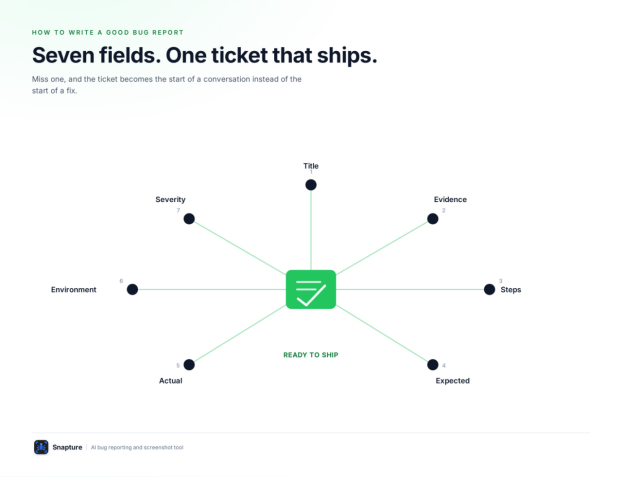
A bug report is ready to send when it has these seven things. Leave any one out and the ticket becomes the start of a conversation instead of the start of a fix.
The Seven Required Fields
A specific title. Names the defect and where it happened — not just that something is broken.
Visual evidence. A screenshot or recording of the failing state, not a description of it.
Reproduction steps. Numbered, starting from a known state, including the data used.
Expected behaviour. What should have happened, written as its own line.
Actual behaviour. What happened instead, described observably.
Environment details. Browser and version, OS, viewport or device, build.
Severity and impact. Who is affected, and whether a workaround exists.
The Floor, Not the Ceiling
This is the floor, not the ceiling. Why Bug Reports Fail covers five more fields — annotations, reproduction frequency, technical output — that strengthen a report further. These seven are the ones that determine whether a developer can start work without asking a question first.
The rest of this guide goes field by field: how to write a title that survives triage, how to structure reproduction steps, how to tell a defect from a requirements gap, a copy-paste template, a fully worked example, and the five mistakes that undo all of the above.
Writing Titles That Survive Triage
A title is often the only line a lead reads before deciding what happens next — assign now, defer, or ask a question. A vague title forces that decision to wait for the question.
The Title Formula
A title that survives triage names the component or page, the specific symptom, and the triggering condition if one exists. That formula, in order, is enough:
[Component/page] + [specific symptom] + [triggering condition, if any]
Weak vs Strong Title Examples
Weak: “Login broken” Strong: “Login fails with "Invalid credentials" for valid SSO users on Chrome” Why it works: Names the affected user group and the exact error, not just the area.
Weak: “Page is slow” Strong: “Product listing page takes 8+ seconds to load with 50+ items in cart” Why it works: Turns a subjective complaint into a measurable, reproducible condition.
Weak: “Checkout issue” Strong: “Discount code accepted but order total unchanged on cart page” Why it works: Identifies the specific step and the specific symptom, not the general feature.
Weak: “UI bug on mobile” Strong: “Primary CTA button hidden behind sticky banner at 390px viewport” Why it works: Gives the exact viewport and defect instead of a device category.
Weak: “Error when saving” Strong: “Save button returns 500 error when project name exceeds 100 characters” Why it works: Includes the trigger condition a generic title omits entirely.
Describe the Failure, Not the Fix
A title describes the failure, not the fix, and not your theory about the cause. "Race condition in save handler" belongs in a comment once confirmed — not in the title of a report a developer hasn't investigated yet.
Reproduction Steps: Starting State, Test Data, Numbered Actions
Reproduction steps exist to let someone who has never seen the failure arrive at it deliberately, not by luck. That requires three things every set of steps must carry.
A Known Starting State
Not "open the app" but the specific page, the specific account or role, and any prerequisite condition (items already in cart, a specific plan tier, a feature flag on). If the starting state is ambiguous, every step after it is too.
The Exact Test Data Used
The promo code, the file uploaded, the search term typed. "Enter a discount code" is not reproducible; "enter code SAVE20 (unused, no expiry)" is.
Numbered Actions, One per Line
Each step is a single action a reader can perform without interpreting it. "Fill out the form and submit" is two or more steps hiding as one.
Weak vs Strong Reproduction Steps
Weak:
Add something to the cart, go to checkout, and try the promo code. It doesn't apply.
Strong:
Go to /products and add any item priced under $50 to the cart
Open /cart
In the promo code field, enter SAVE20
Click Apply
Notice what the strong version does not do: it does not explain why the code fails, or guess at a cause. Reproduction steps answer how do I get there. What happened once you arrive is the job of the next two fields — expected and actual behaviour.
Expected vs Actual, and How to Tell a Defect From a Requirements Gap
Expected and actual behaviour belong on two separate lines, never folded into one sentence. Separating them is what makes a report arguable on facts instead of on tone.
Actual Behaviour
Actual behaviour is what the product did, described observably. "No error shown, total unchanged" beats "the discount doesn't work" — it states what was observed, not a diagnosis of why.
Expected Behaviour
Expected behaviour is what should have happened instead. It is often the single most valuable line in the report, because it is the line that separates a defect from a misunderstood requirement.
Defect or Requirements Gap? The Source Test
Here is the test: if you cannot state expected behaviour with a source — a spec, a design file, a previous release, or an established platform convention — you may not have found a bug yet. You may have found a gap in what "correct" was ever defined to be.
That is still worth reporting. It just needs to be labelled honestly:
Expected: Unclear — no documented behaviour for this case. Flagging for a decision, not filing as a confirmed defect.
This matters more than it looks. A report that states expected behaviour with false confidence sends a developer to fix something that may be working as designed, and the resulting back-and-forth is exactly the friction this guide is trying to remove. When you're not sure, say so — it routes the ticket to the right conversation instead of the wrong fix.
Copy-Paste Bug Report Template
Two versions of the same structure — one for tools that render Markdown, one plain-text for trackers that don't. Both carry the same seven required fields plus the three that make a report stronger: annotations, reproduction frequency, and technical output.
Markdown Version
Use this in trackers that render Markdown: set the title as a heading and put the field labels in bold.
Title: [Component/page] + [specific symptom] + [trigger condition]
URL: [exact page URL]
Environment: Browser/version, OS, viewport or device, build
Steps to reproduce:
[First step]
[Second step]
[Third step]
Expected behaviour: [What should have happened]
Actual behaviour: [What happened instead]
Reproduction frequency: (e.g. 3 of 3 attempts / seen once)
Severity: Critical / High / Medium / Low — who’s affected, workaround if any
Evidence: [Screenshot/recording, annotated]
Console/network output: (if applicable)
Keep Every Field, Even When the Answer Is Short
Keep every field in the template even when the answer is short — an empty Severity field is a visible gap; a missing Severity section is just absent. Delete a field only if it genuinely doesn't apply (Console output on a pure layout bug, for instance), not because the answer takes ten extra seconds to write.
A Fully Worked Example
The Scenario
An illustrative scenario: a tester uploads a 6.4 MB profile photo on the account settings page. Nothing happens — no progress indicator, no error, and the old photo stays in place.
Weak Version
Profile photo upload doesn't work.
Strong Version, Filled From the Template
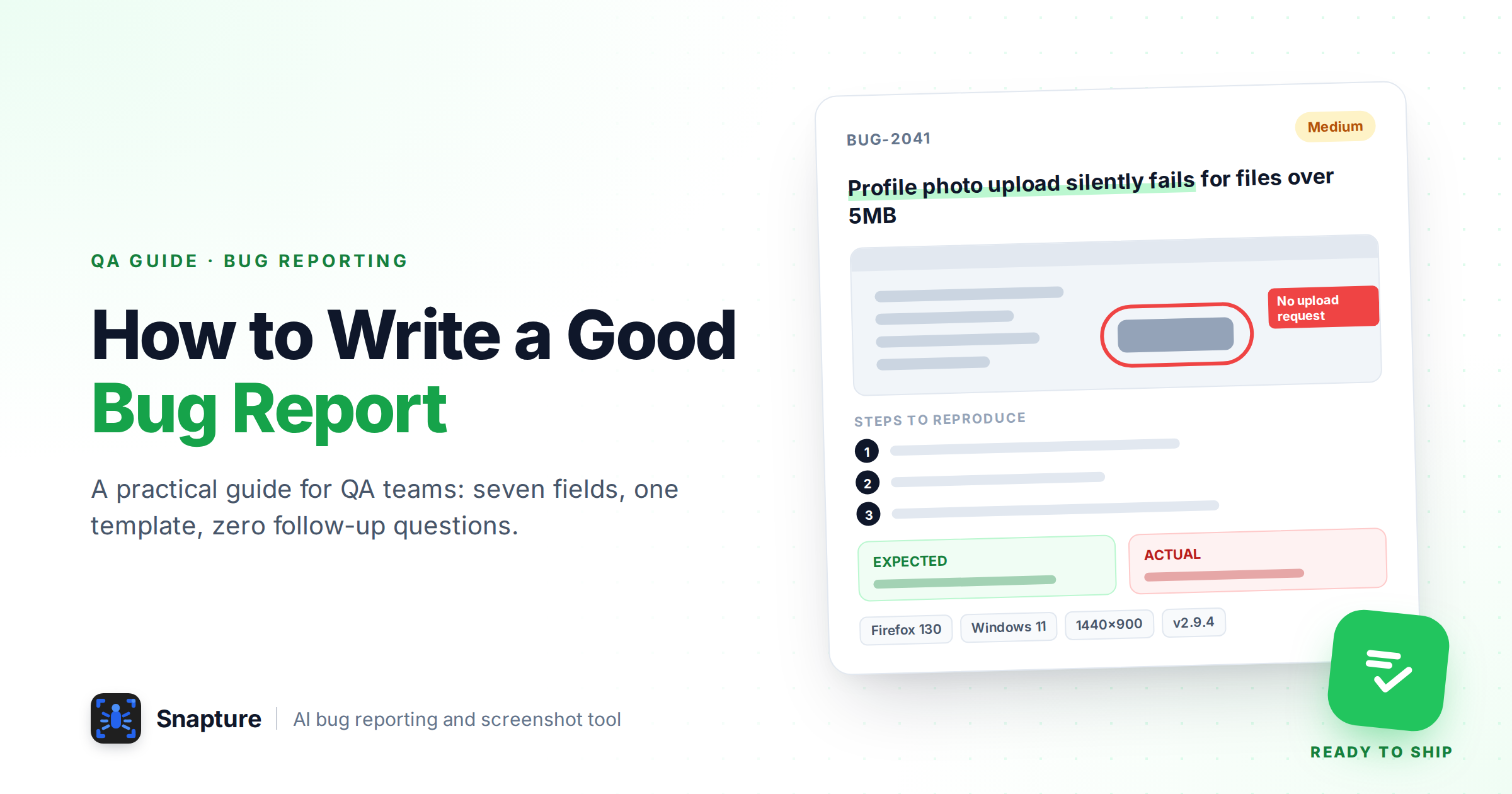
Summary: Profile photo upload silently fails for files over 5MB on account settings page
URL: /settings/profile
Environment: Firefox 130, Windows 11, 1440x900 viewport, build 2.9.4
Steps to Reproduce:
1. Go to /settings/profile while logged in
2. Click "Change photo"
3. Select an image file of 6.4MB (any format: tested with .jpg)
4. Observe the upload panel after selecting the file
Expected Result: Either the photo uploads and replaces the current one, or an error
message states the 5MB file size limit before or immediately after selection.
Actual Result: The file picker closes, no progress indicator appears, no error is
shown, and the previous photo remains unchanged. Network tab shows no request
fired to the upload endpoint.
Reproduction Frequency: 4 of 4 attempts, all with files above 5MB
Severity: Medium — affects any user with a photo over 5MB (common on modern phone
cameras); no error message means users don't know the upload failed or why. No
workaround without external compression.
Attachments: Screen recording showing the silent failure, with the Network tab
visible and no outgoing request
Console/Network Output: No console errors logged. No network request appears for
the upload endpoint after file selection — client-side validation appears to
reject the file before any request is sent.
Why Each Field Earns Its Place
The title states the file-size trigger, which is the detail that makes this reproducible on purpose rather than by chance.
Reproduction frequency (4 of 4) rules out a flaky network issue and points the developer straight at client-side validation logic.
Actual behaviour is written as an observation ("no request fired"), not a diagnosis ("the upload silently rejects large files") — the developer still confirms the cause, but starts from a fact instead of a guess.
Console/network output does the most work in this report: it tells the developer the failure happens before the network call, cutting the investigation from "check the whole upload pipeline" to "check the client-side size check."
Severity explains impact in terms someone prioritising a sprint can use — not "annoying," but who hits it and what happens when they do.
This report is answerable without a reply. That's the bar.
Five Anti-Patterns That Undo a Good Report
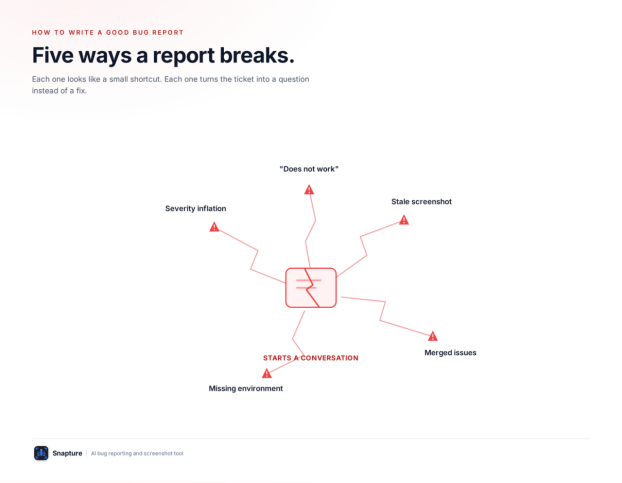
Each of these passes a quick glance and fails on first use.
1. “Does Not Work”
The most common bug report and the least useful one. It documents that the tester noticed something, not what they noticed. Replace it with an observable actual-behaviour line: not "the filter doesn't work" but "selecting 'In Stock' returns 0 results even though 12 in-stock items exist on this page."
2. Stale Screenshots
A screenshot taken against an old build, an old data set, or a state that's since changed sends the developer investigating a problem that may no longer exist. Capture evidence from the exact reproduction you just ran — not from memory, not from an earlier pass, not recycled from a similar-looking bug last week.
3. Merged Issues
Two defects in one ticket cannot be triaged, prioritised, or closed cleanly — one gets fixed, the other gets silently dropped when the ticket closes. If a second problem shows up while reporting the first, file it separately, even if they're on the same page.
4. Missing Environment
Browser, OS, viewport, and build are the first details a tester omits, because they already know them. They're also what most often decides whether a bug reproduces at all. Treat these fields as non-optional, not as detail to add if a developer asks.
5. Severity Inflation
When every ticket is filed as Critical, severity stops carrying information and a lead has to re-triage everything by hand anyway. Set severity by actual impact — who's affected and whether a workaround exists — not by how frustrating the bug was to find. A report that's honest about being Low severity is more useful than one that cries wolf to get attention.
Conclusion
A template only pays off if it's used consistently, not pulled out for the occasional hard-to-explain bug. Standardise it as the default for every ticket, and the seven fields stop being extra work — they become the shape a report is expected to have.
Capture is the fastest way to put this template into practice. Install the Snapture Chrome extension to capture, annotate, and file a report — screenshot, environment details, and issue creation in your tracker — without leaving the page you're testing. Or start with a seven-day free trial, no card required. The fields in the template above map directly to what it captures automatically.
FAQs
What are the must-have fields in a bug report?
A specific title, visual evidence, numbered reproduction steps, expected behaviour, actual behaviour, environment details, and severity/impact. These seven are the minimum for a developer to start work without a follow-up question.
What's the difference between expected and actual behaviour?
Actual behaviour is what the product did, described as an observation. Expected behaviour is what should have happened instead, ideally backed by a spec, design file, or established convention. Writing them as two separate lines — rather than one blended sentence — is what lets a reader evaluate the claim instead of just the tester's opinion.
How do I know if something is a bug or a requirements gap?
If you can state expected behaviour with a source you can point to, it's a defect. If you can't — no spec, no prior version, no convention to cite — you may have found an undocumented case. File it, but label it as a question for clarification rather than a confirmed defect.
Should I use a template for every bug report, even small ones?
Yes. A short bug can have short answers in every field — the point of the template isn't length, it's making sure no field gets silently skipped. Consistency is what makes a backlog scannable by someone who wasn't there when the bug was found.