Why Bug Reports Fail: The Hidden Cost of Missing Context
September 22, 2026
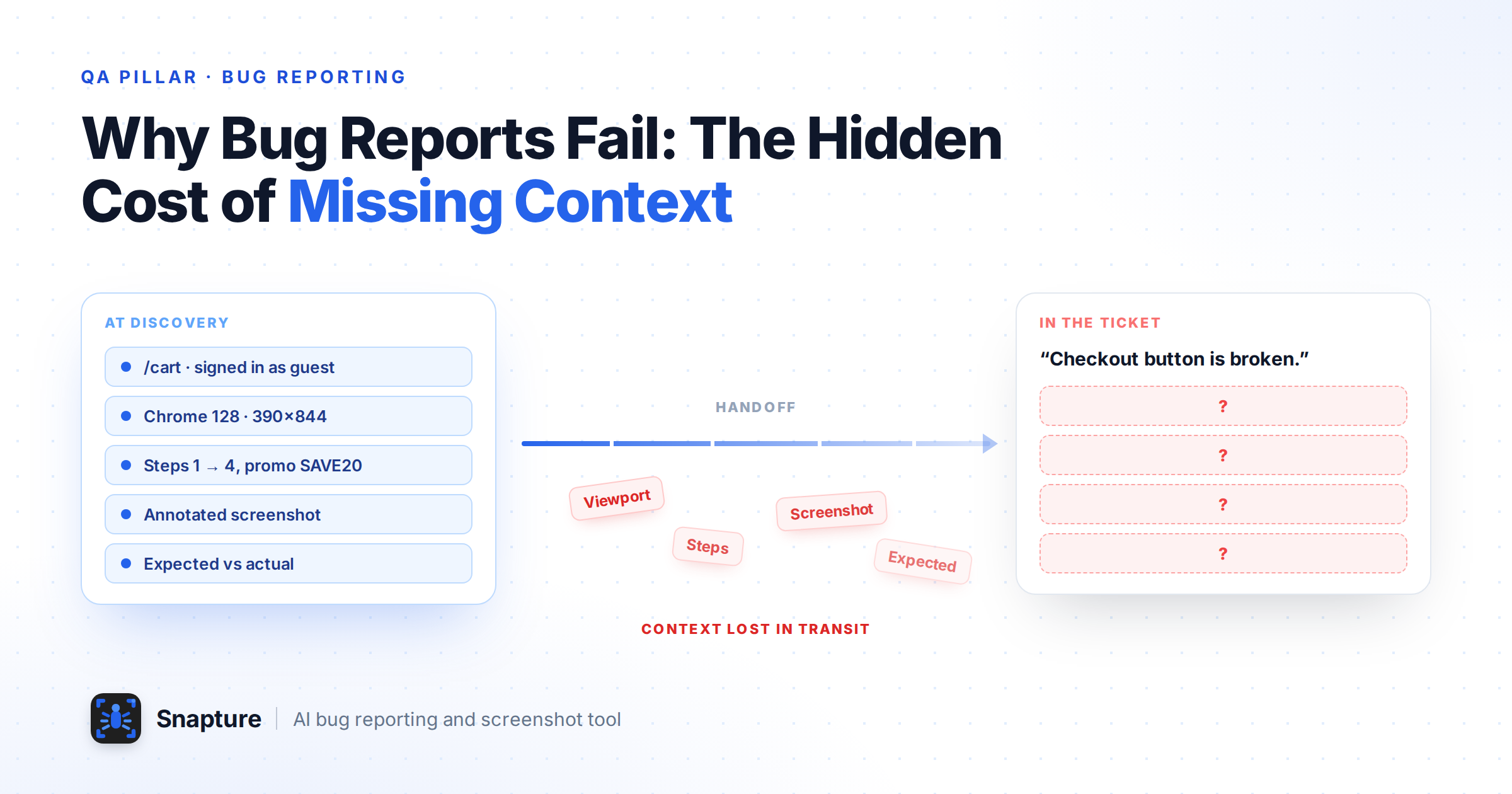
Someone clicks through a checkout flow, notices that the promo field accepts a code but never applies the discount, and knows immediately that something is wrong. That recognition is close to instant. What follows is the actual work: copy the URL, capture the screen, crop the image, upload it somewhere, recall which browser and build this happened on, retrace the clicks that led here, write what should have happened, write what did happen, open the tracker, choose a project, an issue type, a priority, attach the file, submit. Then wait for a developer to ask which environment it was.
Bug reporting is usually treated as a documentation task. It is closer to a transfer problem. At the moment of discovery, one person holds everything: the page, the state, the sequence of actions, the viewport, the visual detail that looked wrong. A ticket is an attempt to move all of that into someone else's head, using a text box.
The expensive part of bug reporting is rarely finding the defect. It is transferring enough context for another person to understand and reproduce it.
What follows maps where that context leaks, what a report needs to carry to survive the handoff, why visual evidence carries more of the load than teams expect, and what a context-rich reporting workflow looks like in practice.
What Makes Bug Reporting Difficult?
Bug reporting is difficult because finding a defect and communicating it are two different skills performed under different conditions. Discovery happens inside a live product with full context available; reporting happens in a separate tool, from memory, minutes later.
Six recurring frictions show up across almost every QA workflow, regardless of team size or tracker.
The Six Recurring Frictions
Context switching. Reporting pulls the tester out of the product and into a tracker, an image editor, and a chat window. Each hop costs attention, and testers mid-flow have an incentive to keep testing and file "properly" later. Later is when detail decays.
Incomplete descriptions. A tester who has just watched a failure knows exactly what they mean by "the button does not work." A developer reading it three hours later does not. Shared context makes vague writing feel sufficient.
Missing visual evidence. Layout, alignment, spacing, and state problems are visual by nature. Describing them in prose converts a picture into a paragraph, and the paragraph is always the weaker artefact.
Missing environment information. Browser, version, operating system, viewport size, device, build, user role, and feature-flag state routinely decide whether a bug reproduces at all. They are also the first details omitted, because the tester already knows them.
Inconsistent formats. When five testers write reports five ways, triage becomes interpretation. Consistency matters more than eloquence in bug report documentation.
Communication gaps. Evidence gets pasted into chat, the ticket gets the summary, and the conversation that explained the issue scrolls away. Two weeks later the ticket reopens and nobody can find the original context.
A Workflow Problem, Not a People Problem
None of this reflects carelessness. It reflects a workflow that asks people to reassemble context by hand, after the fact, in a tool that was not where the bug happened.
Why Context Gets Lost in the Bug Reporting Process
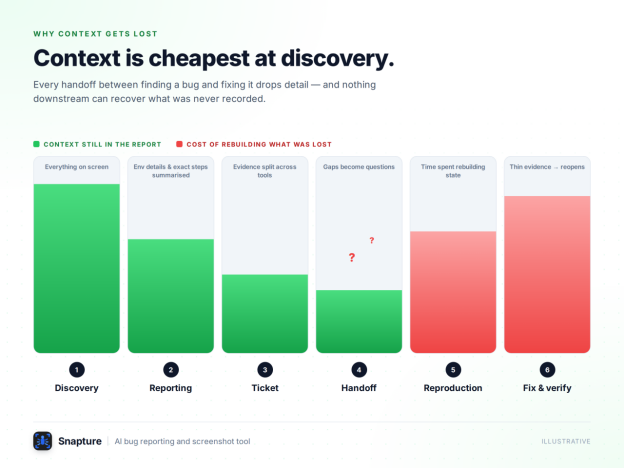
Context is lost in stages. Every handoff between discovery, reporting, ticket creation, and reproduction drops detail, and nothing downstream can recover what was never recorded.
Follow a single issue through a typical bug reporting process and the leak points are easy to see.
Where Context Leaks, Stage by Stage
Discovery: The tester sees the failure live. Where context goes: Full context exists, but only in the tester's head and on their screen.
Reporting: The tester documents it manually, from memory. Where context goes: Environment details, exact steps, and visual specifics get summarised or dropped.
Ticket creation: Text in the tracker, image in a folder, discussion in chat. Where context goes: Evidence fragments across tools and stops travelling with the issue.
Handoff: The developer picks the ticket up hours or days later. Where context goes: Gaps surface as clarification questions, not as blockers.
Reproduction: The developer tries to recreate the conditions. Where context goes: Time is spent rebuilding state the tester already had.
Fix and verification: The issue is understood, patched, retested. Where context goes: Thin original evidence makes verification ambiguous and reopens likely.
The pattern is consistent: context is cheapest at the moment of discovery and most expensive an hour later. A reporting workflow that captures late is fighting its own timing.
What a High-Quality Bug Report Should Capture
A high-quality bug report answers four questions without a follow-up message: what is wrong, where it happened, how to get there, and what should have happened instead.
Twelve elements do that work. Each one exists to remove a specific question from the developer's mind.
The Twelve Elements of a Complete Report
A specific title. "Discount not applied when valid promo code is submitted on cart page" is triageable at a glance. "Promo bug" is not.
Visual evidence. A screenshot or recording establishes the failure as fact and removes any argument about whether the reader is looking at the right thing.
Reproduction steps. Numbered, starting from a known state, including the data used. This is what lets someone else arrive at the same failure deliberately rather than by luck.
Expected behaviour. Often the most valuable line in the report, because it separates a defect from a misunderstood requirement.
Actual behaviour. What the product did, described observably rather than diagnostically. "No error shown, total unchanged" beats "the API call fails."
URL and page context. The exact address, including query parameters and route state. Developers should not have to guess which of three similar pages is meant.
Browser, device, and environment. Browser and version, OS, viewport, device, build or release, and the account or role in use. Many defects are conditional, and the condition is the finding.
Severity and impact. Not a status symbol, a scheduling input. State who is affected and whether a workaround exists.
Annotations on the evidence. An arrow or highlight over the affected region turns a full-page screenshot into a pointed observation.
Reproduction frequency. Whether the failure happened every time or once in five attempts. "Reproduced 3 of 3 attempts" and "seen once, could not repeat" send a developer down entirely different investigation paths, and the difference is only knowable by the tester.
Supporting technical output. Console errors, failed network requests, and relevant log lines when the defect is not purely visual. A red console entry captured at the moment of failure usually shortens the investigation more than another paragraph of description.
One defect per report. Two problems in one ticket cannot be triaged, prioritised, or verified cleanly, and the second one is what gets forgotten. Split them.
Length is not the goal. A report can be short and complete, or long and unusable. Completeness is measured by the questions it prevents.
The Pre-Submit Check
Could someone who has never seen this screen reach the same failure using only this ticket?
Is expected behaviour written as its own line rather than implied by the title?
Does the environment include the viewport or device, not just the browser name?
Is the evidence attached to the issue rather than pasted into a chat thread?
Is this one defect, or two hiding in one ticket?
Why Screenshots Are More Than "Proof"
A screenshot is not just evidence that a bug exists. For visual defects it is the fastest available description, because the reader recognises the problem instead of reconstructing it from prose.
Defects a Screenshot Explains Best
Prose is a poor encoding for spatial information. "The label sits slightly too close to the field above it and wraps at narrow widths" takes a reader several passes and still leaves ambiguity. One annotated image resolves it immediately. This is where visual bug reporting earns its keep, and the defect classes are recognisable to anyone who has run a UI regression pass:
broken or collapsed layouts
alignment, spacing, and overflow problems
incorrect, truncated, or untranslated text
missing elements that should render for a given state or role
visual regressions introduced by an unrelated change
responsive failures at specific breakpoints
wrong component states, such as a disabled control that should be active
overlapping UI, z-index conflicts, and clipped controls
Annotation Turns Evidence Into Explanation
Annotation is what converts a screenshot from a record into an explanation. A full-page capture of a dense dashboard still asks the reader to hunt. The same capture with the affected control boxed and a two-word note attached asks nothing.
Screenshots and Reproduction Steps Work Together
The argument is not that images replace written reports. A screenshot proves the failure and locates it; it cannot tell anyone which data was used, which account was signed in, or which three steps produced the state. Visual evidence answers what is wrong. Structured reproduction information answers how do I get there. A report that survives the handoff carries both.
The Hidden Cost of "Can You Reproduce It?"
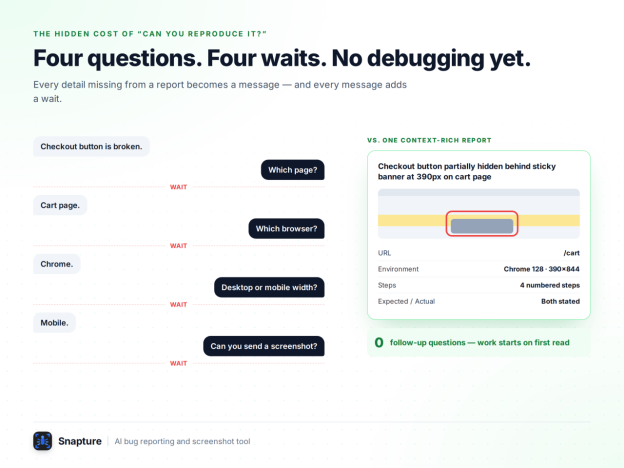
Every detail missing from a bug report becomes a message, and every message adds a wait. The cost is not the typing, it is the elapsed time between question and answer.
A Familiar Exchange
Most QA teams will recognise the shape of this exchange.
QA: Checkout button is broken.
Dev: Which page?
QA: Cart page.
Dev: Which browser?
QA: Chrome.
Dev: Desktop or mobile width?
QA: Mobile.
Dev: Can you send a screenshot?
Where the Real Cost Comes From
Nobody in that exchange did anything wrong. The tester reported a real defect and answered every question accurately. The developer asked exactly what they needed. The workflow is what failed: it let an incomplete report leave the tester's desk, and then charged both people four round trips to rebuild what the tester had known all along.
Those round trips are not evenly spaced. If QA and engineering sit in different time zones, or the tester has moved on to another suite, each question can idle for hours. Meanwhile the ticket sits in progress, the sprint board looks busy, and no debugging has started. Across a release worth of reported issues, that idle time is where bug reporting quietly becomes the bottleneck.
A bug report is only useful when it preserves enough context for someone else to understand and reproduce the problem.
Manual Bug Reporting vs Context-Rich Bug Capture
Manual reporting reconstructs context after the fact from memory. Context-rich capture records it at the moment of discovery, while the evidence is still on screen.
Side-by-Side Comparison
Recording the location: Manual: Copy the URL by hand and paste it into the ticket. Context-rich capture: Page context is captured with the evidence.
Visual evidence: Manual: Screenshot, crop, save to disk, upload. Context-rich capture: Captured from the page in place, no file handling.
Pointing at the problem: Manual: Describe the location in words, or edit the image elsewhere. Context-rich capture: Annotate the capture immediately: highlight, draw, add a note.
Environment details: Manual: Recall and type browser, OS, viewport, build. Context-rich capture: Relevant technical context is attached to the report.
Creating the issue: Manual: Switch tools, pick fields, retype the description. Context-rich capture: A structured issue is assembled from what was captured.
Getting it to the team: Manual: Attach files, paste links, follow up in chat. Context-rich capture: Sent into the tracker the team already uses, evidence attached.
Consistency across testers: Manual: Depends on individual discipline and available time. Context-rich capture: The capture flow enforces a repeatable report shape.
What Capture Does Not Change
Context-rich capture does not make defects easier to find or remove the need to think about severity, root cause, or reproduction. What it can reduce is the manual assembly work between finding a problem and handing over a report someone else can act on.
What Teams Are Building Toward: Screenshot-First Bug Reporting
Screenshot-first bug reporting is a workflow in which visual evidence is captured at the moment of discovery and becomes the starting point of the report, with written detail added around it rather than in place of it.
Why the Inversion Matters
The inversion matters. In a text-first workflow, the report begins as an empty description field and the screenshot is an attachment somebody may get around to. In a screenshot-first bug reporting workflow, the report begins with the evidence, and the writing exists to explain what the evidence shows. Context is recorded while it is free rather than reconstructed once it is expensive.
Snapture as a Worked Example
Several tools now build around this idea. Snapture is one of them, and it works as a useful example here because each part of it lines up with a failure described earlier in this article rather than with a feature category.
Reporting pulls testers out of the product. The Snapture Chrome extension captures from the page being tested in one click, with no file to save and re-upload. Desktop capture covers whatever falls outside the browser window.
The reader cannot tell which part of the screen is wrong. Highlight, draw, blur, and note tools work directly on the capture, so the defect is obvious at a glance and client or customer data can be redacted before the report leaves the tester's machine.
Evidence and metadata drift apart from the ticket. Reports are assembled with their attachments and context together, which keeps the evidence on the issue rather than in a chat thread.
Teams already live in their own tools. Issues are created in the tracker the team already uses, with Jira, Asana, and Trello listed as core integrations, so the reporting workflow fits the existing process instead of replacing it.
Reports vary by author. Tickets arrive with matching headers, environment tags, and attachments, which is what makes a queue triageable by someone who was not testing.
Where QA Judgement Still Applies
Snapture is designed to reduce the manual work and back-and-forth involved in producing context-rich bug reports. It is currently in beta. It does not decide severity for you, write your reproduction steps, or judge whether a behaviour is a defect or a requirements gap. Those remain QA judgement calls, which is the correct division of labour.
How Snapture Solves the Context Problem
The important question is not whether a team can take a screenshot. It is whether the reporting workflow preserves the context that existed when the defect was found. Snapture is designed around that handoff: capture the problem where it appears, add the explanation directly to the evidence, keep the relevant context with the report, and send the result into the team's existing issue workflow.
The point is not to automate QA judgement. Testers still decide whether behaviour violates the requirement, how severe the impact is, and what the correct expected behaviour should be. The value is in reducing the mechanical work required to preserve and transfer the evidence around that judgement.
Here is how that maps to the six reporting frictions described earlier:
Context switching: Capture from the page being tested instead of leaving the product to create and upload evidence manually.
Incomplete descriptions: Use the captured screen as the starting point for the report, then add the reproduction and expected-versus-actual details around the evidence.
Missing visual evidence: Make the screenshot or recording part of the report, with annotation tools that point directly to the affected area.
Missing environment information: Keep the environment and report context together so the ticket carries more than a description of the symptom.
Inconsistent formats: Use a repeatable report structure so tickets arrive with consistent information and attachments.
Communication gaps: Send the report into the team's existing tracker so the evidence stays connected to the issue instead of living in a separate chat thread.
An Illustrative Example: The Half-Hidden Checkout Button
The following is an illustrative scenario, not a customer case study. A tester finds that on a 390 px viewport the primary checkout button is partially cut off by a sticky promotional banner, so only its top third is tappable.
"Checkout button is broken on mobile."
Four questions arrive before work can start: which page, which device or width, broken how, and does it reproduce on desktop.
Title: Checkout button partially hidden behind sticky banner at 390px on cart page
Evidence: annotated screenshot, affected button boxed, overlap region marked
URL:/cart with two items in the basket
Environment: Chrome 128, macOS 14, 390 x 844 viewport, build 4.12.0-rc2
Steps: 1) add any item to cart, 2) open /cart at 390 px width, 3) scroll to the order summary, 4) attempt to tap Checkout
Expected: the Checkout button is fully visible and tappable
Actual: the sticky banner overlaps the lower two-thirds of the button; taps in that area dismiss nothing and do not proceed
Severity: high, blocks purchase completion at a common mobile width, no workaround
The second report is not longer for its own sake. It is actionable on first read: a developer can open the exact page at the exact width, see the annotated overlap, and go straight to the banner's positioning and stacking context. The first report buys a conversation. The second buys a fix.
What This Means for QA and Development Teams
Better context does not just speed up individual tickets. It changes the shape of the QA and development relationship, from interpretation to verification.
Cleaner handoffs. Reports arrive ready to work rather than ready to discuss.
Fewer clarification cycles. Details captured once do not need to be asked for twice.
Easier reproduction. Conditional defects stay reproducible because the condition was recorded, not remembered.
Stronger evidence. Annotated visuals give triage and prioritisation something concrete to weigh.
More consistent tickets. A repeatable report shape makes issue tracking scannable and reporting quality less dependent on who was testing.
Less context switching. Testers stay in the product longer, which is where they find things.
Better traceability. Evidence attached to the issue keeps the record intact for regression checks, reopens, and client-facing reporting.
Why Agencies Benefit Most
For agencies and teams handling several client products at once, the consistency benefit tends to matter most. A predictable report format travels across projects and stakeholders in a way that individual writing style never does.
A Better Bug Reporting Workflow
A reliable bug reporting workflow captures evidence before writing prose, and records environment context while the tester is still in the failing state.
This sequence is tool-agnostic. It is worth adopting whether or not you ever use a capture tool.
The Eight-Step Workflow
Identify the problem and freeze the state. Before navigating away, confirm what you are looking at. The failing state is the most valuable thing on your screen.
Capture visual evidence immediately. Screenshot for static defects; screen recording when the failure involves motion, timing, or a sequence of interactions.
Highlight the affected area. Box, arrow, or note the exact region. Assume the reader has never seen this screen.
Record reproduction context. URL, steps from a known starting state, test data, account or role, browser and version, OS, viewport, build.
State expected against actual behaviour. Two separate lines. If you cannot state the expected behaviour, you may have found a requirements gap rather than a bug, which is itself worth reporting.
Set severity and impact deliberately. Note who is affected and whether a workaround exists, so prioritisation is not guesswork.
Send it to the team's existing tracker. One destination, correct project, correct issue type. Evidence in chat is evidence that will be lost.
Keep the evidence attached to the issue. Verification, reopens, and release reporting all depend on the original evidence still being there.
Teams that formalise this as a bug reporting workflow rather than a habit see the benefit compound, because consistency is what makes triage fast.
Conclusion
Good bug reporting is not about writing longer tickets. It is about preserving the right context at the moment it still exists, so that nobody has to rebuild it later from memory and follow-up questions. Most reports that fail do not fail because the tester wrote badly. They fail because the workflow asked for documentation after the fact, in a different tool, from a different mental state.
Screenshot-first, context-rich capture is a straightforward correction: record the evidence where the bug lives, annotate it while the problem is fresh, attach the technical context with it, and push a structured issue into the tracker the team already uses. The report becomes a by-product of testing rather than an interruption to it.
Two things are worth doing this sprint, whatever tooling you use. Look back at your last batch of closed bug reports and count how many needed a clarification comment before work could start. Then run one regression pass where every report begins with an annotated capture and a complete environment block, and count again. That second number is the one that tells you whether your bug reporting process is costing you time.
If you want to run that pass with capture built into the workflow rather than bolted onto it, install the Snapture Chrome extension and start the seven-day free trial, no card required. Judge it on one thing: how many follow-up questions the tickets from that pass attract.
A Simple Way to Evaluate the Solution
Do not evaluate a bug-capture workflow by how impressive the capture itself looks. Evaluate the handoff. Take a real regression pass and compare the number of clarification questions, the time between discovery and a developer being able to reproduce the issue, and how often evidence has to be found outside the ticket. If those numbers improve, the workflow is solving the actual problem.
That is the distinction between adding another screenshot tool and improving bug reporting: the goal is not more images. The goal is fewer missing pieces between finding a defect and fixing it.
FAQs
What makes a good bug report?
A good bug report makes the problem visually obvious and reproducible without follow-up questions. At minimum it needs a specific title, visual evidence, numbered reproduction steps, expected and actual behaviour, the URL or page context, environment details, and a severity assessment. Completeness matters more than length: the test is how many questions the report prevents.
Why are screenshots important in bug reporting?
Screenshots communicate visual defects faster and more accurately than written description, because the reader recognises the problem instead of reconstructing it from prose. They are especially valuable for layout, alignment, text, state, and responsive issues. Annotating the affected area turns a screenshot from evidence that a bug exists into an explanation of what is wrong. Screenshots complement reproduction steps rather than replacing them.
What information should developers receive with a bug report?
Developers need to know where the issue happened, how to get there, what they should see, and what they actually see. In practice that means the exact URL or screen, steps from a known starting state with the test data used, expected and actual behaviour, browser and version, operating system, viewport or device, build or release version, and the account or role in use. Annotated visual evidence should be attached to the issue itself, not shared in a chat thread.
How can teams reduce back-and-forth when reporting bugs?
Reduce it by capturing context at the moment of discovery instead of reconstructing it afterwards. Standardise a report template so environment and reproduction fields are never optional, capture and annotate visual evidence before leaving the failing screen, and keep evidence attached to the ticket. Capture tools that create the issue directly in your tracker can reduce the manual assembly work that causes details to be skipped.